 TeamVista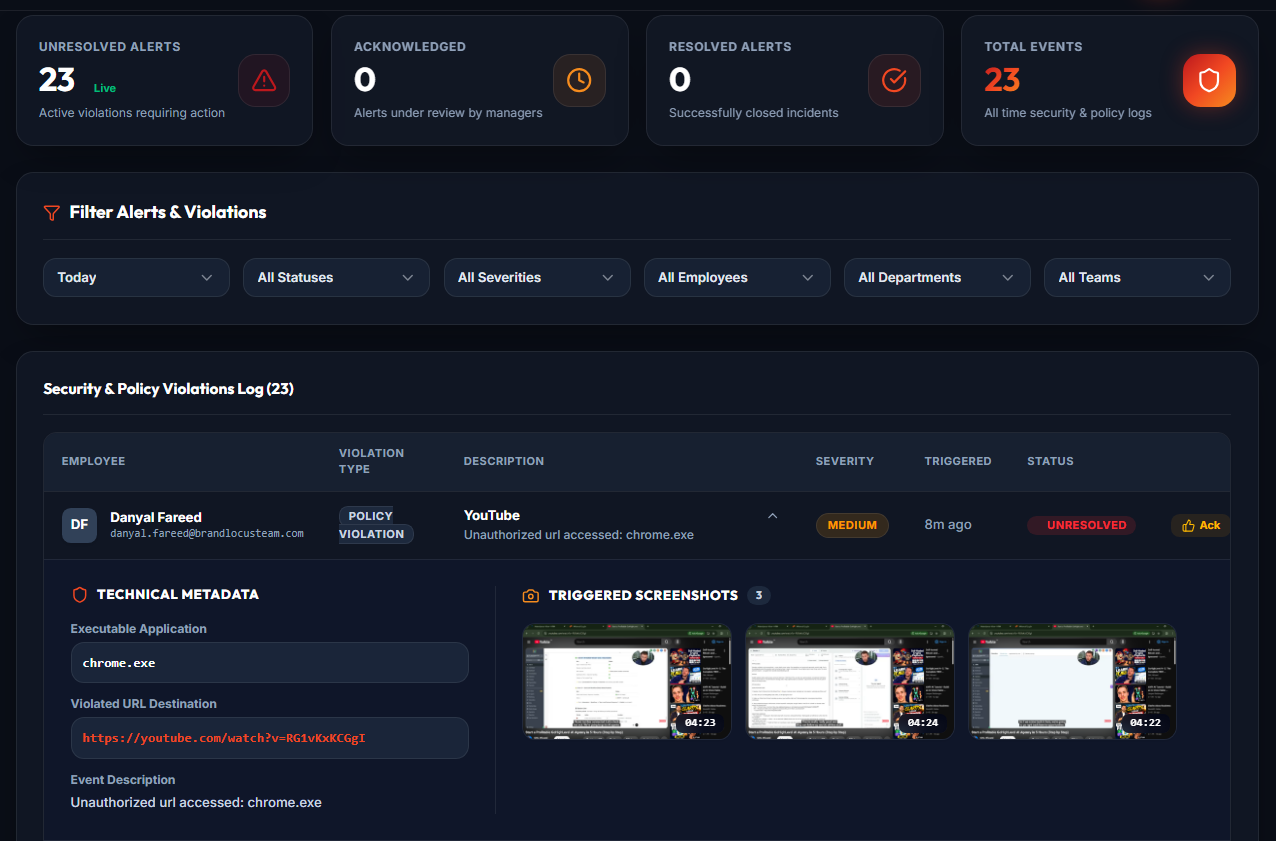
Employee Activity Alerts: Know When Your Team Needs Attention
Managing a team means keeping track of more than just attendance. You also need to understand how workdays are progressing, whether employees are following their schedules, and when something might need your attention.
But constantly checking every employee's activity isn't practical.
That's where TeamVista Alerts comes in.
TeamVista helps managers identify activity patterns and workplace events worth reviewing, so they can focus on the situations that matter instead of spending their entire day checking dashboards.
What Are TeamVista Alerts?
TeamVista Alerts are notifications that help HR managers and supervisors identify potential concerns in employee attendance and recorded work activity.
Rather than requiring managers to manually review every work session, alerts draw attention to events that may deserve a closer look.
For example, an employee might be inactive for an extended period during a scheduled work session. An alert can help a manager notice the situation and review the available records.
An alert highlights something worth checking. It does not automatically mean an employee has done something wrong.
Why Employee Activity Alerts Matter
In a busy workplace, managers are responsible for multiple employees, schedules, and daily operations.
Without a clear way to identify unusual activity, important events can go unnoticed or require time-consuming manual checks.
TeamVista helps make this process easier.
1. Spot Potential Issues Earlier
Instead of discovering concerns long after a workday ends, managers can review alerts as they become available.
This helps teams respond to attendance or activity concerns in a more timely manner.
2. Spend Less Time Checking Dashboards
Managers shouldn't have to repeatedly open individual employee profiles just to understand whether something needs attention.
Alerts provide a starting point for deciding which work sessions may need reviewing.
3. Understand What Happened During a Work Session
An alert becomes more useful when reviewed alongside the employee's recorded activity.
Depending on the available records, managers can examine session times, breaks, idle periods, and application activity to better understand the situation.
4. Make Fairer, More Informed Decisions
A period of inactivity does not necessarily mean an employee was neglecting work.
They might have been attending a meeting, speaking with a customer, or completing a task away from the computer.
TeamVista provides recorded information to support a review, while the manager remains responsible for understanding the circumstances.
Common Situations Worth Reviewing
Different workplace events may require different levels of attention.
Extended Inactivity
An employee may have a longer-than-expected period without recorded computer activity.
Managers can review the relevant session information and determine whether the inactivity requires any follow-up.
Attendance Concerns
Unexpected attendance patterns, such as missed or late work sessions, may deserve review against the employee's assigned schedule.
This helps managers distinguish scheduling issues from attendance concerns.
Unusual Work Activity
Changes in recorded work patterns may prompt a closer look at how time was spent during a session.
The goal is to understand the situation rather than make assumptions based on a single number.
Repeated Alerts
When similar concerns appear across multiple work sessions, reviewing the broader pattern can be more useful than focusing on one isolated event.
Managers should consider the employee's responsibilities, schedule, and any relevant explanations.
How to Review an Alert Effectively
An alert is most valuable when it leads to a clear, fair review process.
Here's a practical approach.
Step 1: Identify What Needs Attention
Start by reviewing the alert and understanding the event it highlights.
Consider what was recorded and when it occurred.
Step 2: Check the Employee's Work Session
Open the relevant employee session and compare the recorded session times with the assigned work schedule.
Look at the overall workday rather than treating a single event as the complete picture.
Step 3: Review the Available Activity Records
Where available, examine the surrounding application activity, breaks, idle history, and screenshots.
These records can help establish what the system captured before and after the event.
Remember that screenshots and activity logs cannot explain everything an employee was doing.
Step 4: Consider the Context
Before drawing conclusions, consider whether the employee's responsibilities involved work away from the computer.
Meetings, phone calls, discussions, and other legitimate tasks may not always appear as active computer usage.
Step 5: Have an Informed Conversation
If something still needs clarification, speak with the employee.
Use the recorded information to ask specific questions rather than making immediate assumptions.
The purpose of reviewing an alert is to understand what happened, not to automatically assign blame.
Alerts and Employee Productivity
Employee productivity is about more than keeping a computer active.
A person may spend hours using applications without producing meaningful results. Another employee may complete important work through planning, collaboration, or discussions that involve little computer activity.
TeamVista Alerts should therefore be used as one part of a broader management process.
Managers can combine recorded activity with completed assignments, work quality, deadlines, and employee feedback to develop a more balanced understanding of performance.
Building a More Accountable Workplace
Effective employee monitoring should create clarity for both managers and employees.
For managers, this means having useful information available when questions arise.
For employees, it means workplace activity is reviewed in context rather than judged solely by automated indicators.
When used responsibly, alerts can support better communication, more consistent oversight, and earlier identification of issues that genuinely require attention.
Final Thoughts
Managing employees shouldn't require watching every screen or manually checking every minute of the workday.
TeamVista Alerts helps managers know where to look, review the available information, and decide when a conversation is needed.
The system highlights recorded events. People provide the context and make the decisions.
That's how employee monitoring becomes a more useful part of everyday team management.
---
Want to understand your team's work activity more clearly?
Explore TeamVista and discover how attendance tracking, work session reviews, and activity alerts can help you manage your workforce with greater confidence.